


TuneClone Audio Converter Software
Convert any music format to unprotected MP3 via virtual CD burning
Download | Order Now!
Get Converted. Enjoy Your Purchased Music Anywhere!
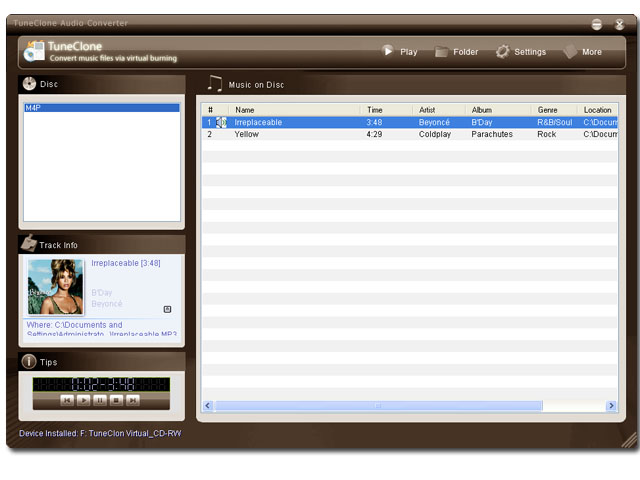 Main Window of TuneClone.
All your music will be listed under the playlist name after you burning your playlist to TuneClone's virtual CD burner. All music files listed here is in unprotected MP3,WMA or WAV format.
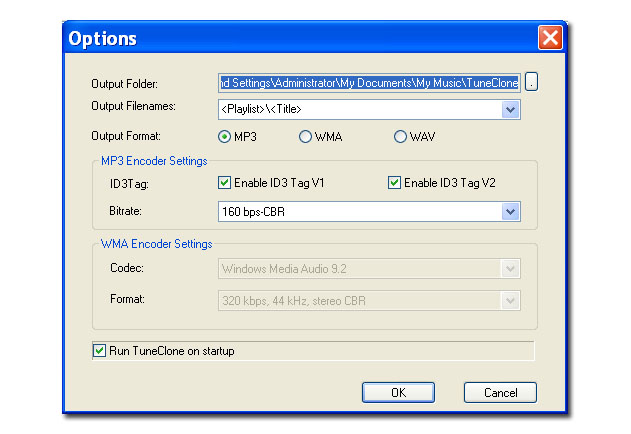
TuneClone settings window. You can adjust the output format and its parameters at the setting window.

News
- TuneClone Version 1.02 Released on May 15,2022
- TuneClone Version 1.00 Released on May 10,2022
Guides
How to convert iTunes M4P to MP3?
How to play M4P on BlackBerry?
Testimonials
"If you have lots of music, you might need a big pile of CDs to convert everything with the "burn and rip" method above. That's where software can help. A "virtual CD drive" such as TuneClone can simulate a real CD burner, eliminating the need for real CD-R discs. The Windows operating system will treat the virtual drive just like a real one, so you can tell your CD burning software to access the virtual drive by it's own drive letter." --Bob
"I've been waiting a long time to 'free my iTunes' to use on my Walkman mobile phone, and the only way I could do it before was to burn to CD then rip back again. A very lengthy process, which normally ended up full of faults and a lot of wasted disks!! Not any more!!" -- David
Social Bookmark


 google
 yahoo
yahoo technorati
 icerocket